> ## Documentation Index
> Fetch the complete documentation index at: https://docs.vatel.ai/llms.txt
> Use this file to discover all available pages before exploring further.
# SIP Trunking
> Connect your agents via SIP for maximum flexibility and carrier choice
Connect your Vatel AI agents over SIP so you can use your own carrier or PBX. This walkthrough shows how to create and configure a SIP trunk.
## Create a SIP trunk
When creating the trunk, select a **PBX** type. The choice mainly affects the UI and some peripheral integrations, not core SIP behavior.
| Option | Description |
| ----------------------------- | ---------------------------------------------------------- |
| **Generic** | Standard SIP trunking; no PBX-specific UI or integrations. |
| **3CX, Yeastar, Webex, etc.** | PBX-specific UI and optional integrations. |
Set the **inbound** authentication strategy and provide the required parameters:
| Strategy | Parameters | Description |
| ---------- | -------------------------- | ------------------------------------------------------- |
| **Digest** | **Username**, **Password** | Inbound calls must authenticate with these credentials. |
| **ACL** | **IP address** (or range) | Only traffic from that IP is accepted. |
| **None** | - | No authentication; no extra fields. |
Choose whether outbound SIP INVITEs (and transfers) use credentials:
| Option | Description |
| ----------------------- | -------------------------------------------------------------------------------------------------- |
| **No credentials** | Outbound INVITEs are sent without credentials. |
| **Provide credentials** | Outbound INVITEs can respond to digest authentication when the carrier or PBX challenges the call. |
The same outbound config is used for **outbound calls** and **transfers**.
Assign one or more agents to the trunk. Each **agent assignment** links an agent to the trunk and exposes **SIP URIs** reachable for that agent.
| Field | Description |
| -------------- | ------------------------------------------------------------------------------------------------------------- |
| **Agent** | The agent to assign to this trunk. |
| **SIP URI(s)** | URIs to reach this agent on the trunk; default **sip:(ID)@sip.vatel.ai** where **(ID)** is the assignment ID. |
Use these URIs in your PBX or carrier as the destination for calls you want handled by each agent.
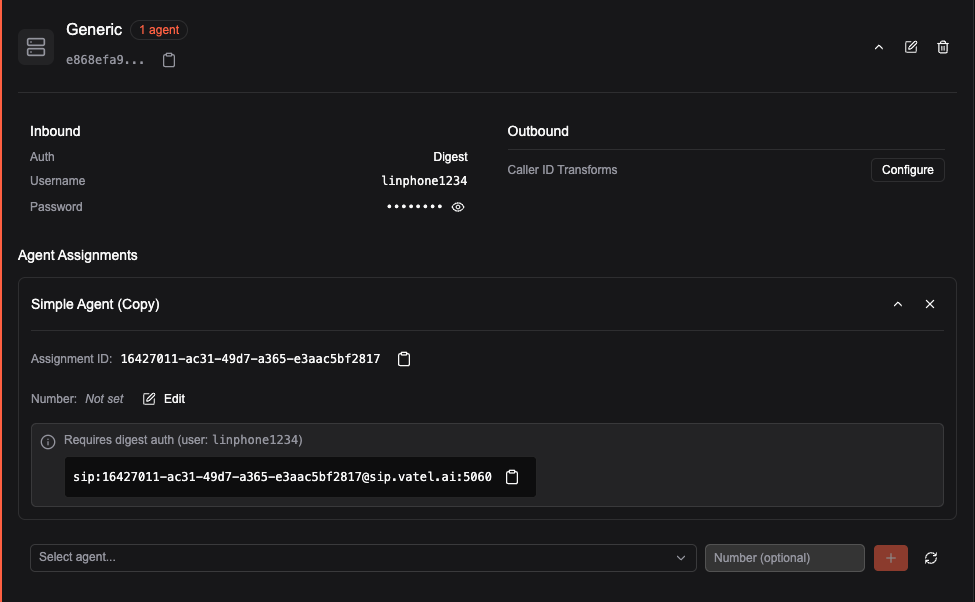 After the trunk is created and assignments are in place, point your PBX or carrier at the trunk’s address and use the assignment SIP URIs as the destination for calls you want handled by each agent.
**Alternative number per assignment.** For every assignment you can configure an **alternative number**. By default the SIP URI user part is the assignment ID (e.g. **sip:(ID)@sip.vatel.ai**). If you set an alternative number, that value is used as the user part instead (e.g. **sip:[5551234@sip.vatel.ai](mailto:5551234@sip.vatel.ai)**). This can help when your PBX expects a specific number or format in the SIP URI.
After the trunk is created and assignments are in place, point your PBX or carrier at the trunk’s address and use the assignment SIP URIs as the destination for calls you want handled by each agent.
**Alternative number per assignment.** For every assignment you can configure an **alternative number**. By default the SIP URI user part is the assignment ID (e.g. **sip:(ID)@sip.vatel.ai**). If you set an alternative number, that value is used as the user part instead (e.g. **sip:[5551234@sip.vatel.ai](mailto:5551234@sip.vatel.ai)**). This can help when your PBX expects a specific number or format in the SIP URI.